Printable Staff Paper Margins for Cleaner Classroom Prints
Why cropped notation happens when printing staff paper
Printed staff paper often looks fine on screen and then loses the left barline or top staff after printing. That usually happens when paper size, scale, and printable area do not match each other. Teachers notice it first when class sets come out with clipped notation, while students notice it when ledger lines fall too close to the edge.
The fastest way to avoid that waste is to set page rules before exporting. A template with stable margins keeps staves readable and gives enough white space for markings. It also reduces reprints, which matters when a lesson starts in a few minutes.
Before adjusting settings, open the custom staff paper generator and decide where the page will be used. A worksheet for beginners needs wider spacing than a compact harmony draft. A composition page for advanced students can hold more systems, but only if line weight stays visible on your printer.
This guide focuses on practical print control. It covers page size, scaling, margin ranges, and a short preflight routine that catches defects before bulk printing.
Page size, scale, and margin basics for printable staff paper
A4 vs Letter setup and why default scaling causes cut-offs
A4 and US Letter are close, but not the same shape. [RPI standard paper sizes] list US Letter as 8.5 x 11 inches (215.9 x 279.4 mm). The same reference lists A4 as 210 x 297 mm. When a Letter layout is sent to an A4 default queue, printer software may scale or shift content to fit hardware limits.
Even a small automatic resize can push the first or last staff into a non-printable strip. Most home and school printers reserve a narrow edge where ink is not placed. If your score already sits close to that edge, the resize turns a clean layout into a clipped one.
[NIST SP-1021]references letter-size sheets at 216 mm by 279 mm, matching the familiar 8.5 by 11 format used in many US workflows. The practical takeaway is simple: template geometry must match the physical stock you load.
Use one page size from start to finish. Select Letter in the generator, set the same size in your PDF export, then confirm the same size in printer properties. If your school prints on A4, build the template on A4 from the first step instead of converting at the end.
Margin ranges that keep staves readable for students
Margins are not only about preventing cut-off marks. They also shape readability, annotation room, and binder safety. In classrooms, a narrow margin may look efficient but often leaves no space for fingering notes, dynamic cues, or teacher corrections.
For beginner worksheets, a practical baseline is a wider outer frame with fewer systems per page. For intermediate classes, margins can be slightly tighter if staff spacing stays comfortable. The goal is consistent reading flow, not maximum line count.
A good starting rule is to keep top and bottom margins balanced and leave extra room on the binding side. After building that template once, save it in your print-ready staff paper workspace so weekly lesson prep stays consistent.
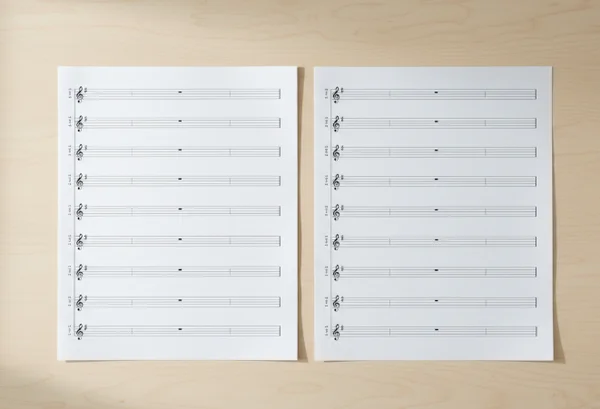
If the printer is shared by multiple rooms, run one sample print and mark the real printable boundary with pencil. Compare that boundary with your template margins. This simple physical check prevents hidden driver overrides from damaging an entire batch.
Troubleshooting print defects before you run class copies
A five-check preflight for clipping, faint lines, and uneven spacing
A short preflight can remove most printing surprises. Use this five-check sequence before running twenty or fifty copies.
- Confirm page size in three places: template settings, PDF properties, and printer dialog.
- Verify scale is set to actual size or 100%, not automatic fit.
- Print one page and inspect all four edges for clipped barlines or note stems.
- Check staff line darkness under classroom lighting, not only near the printer.
- Measure one staff block quickly to confirm spacing is uniform from top to bottom.
NIST conference template guidance publishes separate files for 8.5 x 11 and A4 formats in [its sample template package]. That separate-template approach is useful for music teaching too. Keep one template family per paper standard, rather than converting the same file each time.
When faint lines appear, increase line thickness in the generator before raising printer contrast. Hardware contrast changes can darken everything, including student pencil work. Template-level adjustments give more predictable results.
If uneven spacing appears only on some pages, check whether duplex mode was enabled by default. Some drivers silently switch scaling or margins when two-sided mode is active. For notation worksheets, single-sided output is often safer unless duplex behavior is fully tested.
When to export a fresh PDF instead of reprinting old files
Reprinting an old PDF saves time only when layout assumptions are unchanged. If printer firmware, default queue, or paper stock changed since the previous term, a fresh export is usually safer. Small environment changes can alter margins without obvious warning.
Export a new PDF when any of these conditions apply:
- You switched between A4 and Letter stock.
- You changed staff spacing or system count.
- Another department modified shared printer defaults.
- Last batch showed clipped symbols or faint staves.
A fresh export also helps with version clarity. Label files with date and class level, then keep one approved baseline in your blank score template panel. That reduces confusion when several teachers share similar worksheet sets.
Key takeaways and a repeatable margin setup routine
Cleaner music worksheets come from consistent geometry, not from last-minute print fixes. Match page size early, keep scaling explicit, and protect margins that support writing and annotation. Run one sample page every time print conditions change, even if the template worked last week.
For regular teaching cycles, use this repeatable routine: select paper standard, apply saved margin profile, print one proof page, and approve line visibility before bulk copies. This routine takes only a few minutes and prevents most paper waste.

When a class needs a new layout, build it once and archive it by use case, such as sight-reading drills, dictation practice, or duet sketching. Then start each session from the right preset inside the classroom staff paper builder. Stable presets keep lesson prep quick while preserving readable notation on every page.